Mac OS:
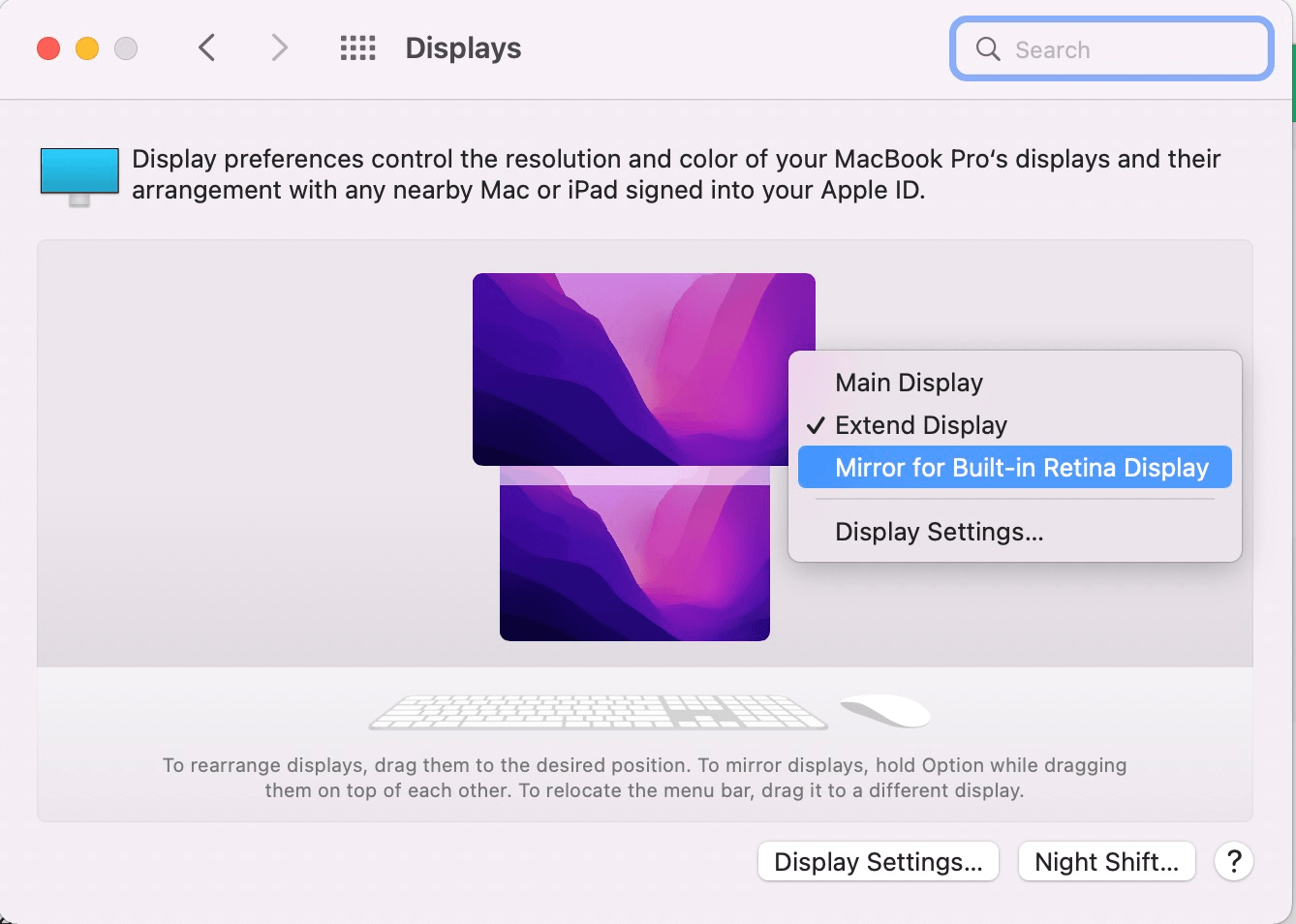
Mirror Display Settings:
Apple lcon > System Preferences > Displays
Right click on the monitor icon and select the “Mirror for Built-in Retina Display”.

Extend Display Settings:
Apple lcon > System Preferences > Displays
Right click on the monitor icon and select the “Stop Mirroring”.

Main Display Settings:
Apple lcon > System Preferences > Displays
Right click on the monitor icon and select the “Main Display”.

Resolution & Refresh Rate Settings:
Apple lcon > System Preferences > Displays > Display Settings
Check the right resolution under the “Scaled” menu.
Check the right Refresh Rate under the “Refresh Rate” menu.

Windows Mirror Mode:
Right click desktop >Graphics Settings >Display >Clone Display
Windows None-Mirror Mode:
Right click desktop >Graphics Settings >Display >Extended Desktop

Resolution Settings:
Right click Desktop > Display Setting
Check the right resolution under the “Resolution” menu.